
Deploying a modern enterprise platform is one of the most significant strategic decisions an organization can make. Yet building a predictable budget for a Salesforce rollout is notoriously difficult, and final costs have a habit of diverging from the number on the original proposal.

The software is rarely the surprise. The surprise is everything around it, the human capital, the configuration hours, the operational adjustments it takes to turn a platform into something your team actually uses. Understanding how those costs are structured is how you plan a realistic budget and avoid the line items that show up after you’ve already signed.
Why Salesforce Implementation Costs Vary
There’s no single price tag for a Salesforce deployment, because no two organizations run the same way. Your final number is driven by scale, process complexity, and what you’re actually trying to accomplish.
A simple out-of-the-box setup for a small sales team takes a fraction of the hours a multi-cloud deployment does. Industry adds another layer entirely. Public sector agencies and defense contractors often need Government Cloud environments, which bring compliance frameworks like FedRAMP, CMMC, or ITAR into the picture. Those frameworks mean specialized security controls and an Authority to Operate (ATO) advisory phase that most commercial-sector budgets never have to account for.
Legacy migration adds complexity too. Moving off a heavily customized system, whether that’s an old Microsoft Dynamics setup or a decade of spreadsheets held together with tribal knowledge, means replicating workflows carefully. That takes custom development, detailed data mapping, and validation testing to make sure years of institutional history survive the move intact.
Core Cost Categories to Include in Your Budget
Licensing & platform costs
Licensing is the base layer, typically billed on an annual contract, and it scales with how much automation and functionality you need. Salesforce also reworked its Sales and Service editions on September 3, 2026. New Core, Advanced, and Max editions replaced Enterprise, Unlimited, and Agentforce 1 for new buyers, and each now bundles Slack, Tableau Next, security, support, and a pool of Flex Credits for AI usage.
The per-user price went up, but some add-ons you may have budgeted for separately are now included, so compare what’s in each bundle before comparing list prices. Customers on legacy editions can keep their current pricing. Here’s Salesforce’s current published list pricing:
| Edition | List price (per user, per month) | What to know |
| Starter Suite | $25 | Entry-level CRM for small teams; billed monthly or annually |
| Pro Suite | $100 | More automation and customization; billed annually |
| Core | $195 | Replaced Enterprise ($175); includes 500,000 Flex Credits per org |
| Advanced | $395 | Replaced Unlimited ($350); includes 1 million Flex Credits per org |
| Max | $550 | Replaced Agentforce 1 at the same price; includes 2.75 million Flex Credits per org |
Add-ons carry their own separate fees. Account Engagement, Salesforce’s marketing automation product, starts at $1,250 per month for up to 10,000 contacts.
If you’re a qualified nonprofit or educational institution, this is where things get more favorable. Through Salesforce’s Power of Us program, eligible organizations receive 10 free licenses, with discounted pricing on anything beyond that. That’s real budget you can redirect toward mission work instead of software fees, and it’s a big part of why we spend so much time in the nonprofit and government space. Government agencies aren’t eligible for Power of Us. They usually buy through public sector contract vehicles, so pricing and procurement timelines work differently.
Implementation & consulting services
Buying licenses doesn’t activate anything. Someone still has to configure the platform around how your team actually works, and that’s where a lot of first-time budgets get the sequencing wrong.
We run every engagement through four phases: Discovery, Setup, Extend, Enhance.
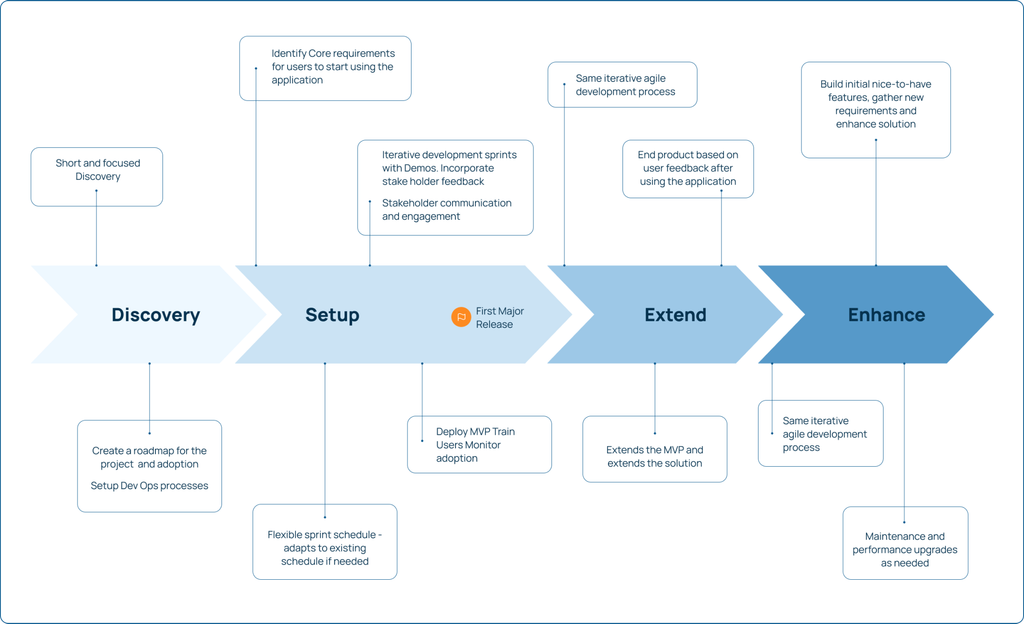
- Discovery maps your processes and identifies where automation actually helps (not just where it’s technically possible).
- Setup configures and deploys the highest-impact features first, so your team sees value fast instead of waiting months for a “big reveal.”
- Extend brings in the rest of the business processes.
- Enhance is ongoing, and it’s where we make sure your team can run the thing without us.
That sequencing matters because it’s the difference between a budget that holds and one that doesn’t. Skip discovery to save a week, and you’ll pay for it later in change orders.
Custom development & integrations
When out-of-the-box features can’t handle a specific business rule, custom development becomes necessary, writing bespoke code for unique automations or custom objects.
Your CRM also doesn’t operate alone. It needs to talk to your ERP, legacy inventory system, or billing engine, and building those connections is a specialized job, often involving middleware platforms like MuleSoft’s Anypoint or Composer to keep systems talking to each other cleanly.
Data migration & data quality
Moving data from an old system into a new one is one of the highest-risk phases of any implementation. It means mapping legacy tables, cleansing duplicates, and making sure the historical record stays accurate. Most teams underestimate how messy their legacy data actually is, and fixing data hygiene issues mid-project is a leading cause of launch delays.
This is exactly why scoping matters before you migrate a single record. In one recent engagement, a state public service commission needed to expand an existing Salesforce environment to manage private car assessments, without disrupting the current data model. Because the scope was tightly defined upfront (specific objects, specific automations, a clear data plan) we delivered the full expansion, including legacy data migration, in three weeks. Clean scoping is what makes a fast timeline possible without cutting corners.
Hidden Costs Often Overlooked
The technical launch is only half the job. Several costs tend to escape early budgeting cycles entirely.
Change management and adoption
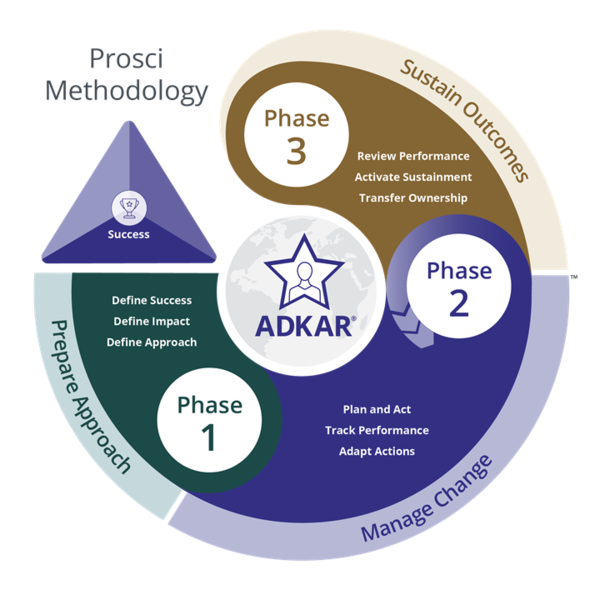
Structured change management is not a nice-to-have. Prosci’s research, drawn from thousands of projects, has consistently found that initiatives with excellent change management are about seven times more likely to meet their objectives than those with poor change management.
Source: https://www.prosci.com/blog/the-importance-of-integrating-individual-and-organizational-change
We build ours on the Prosci™ methodology and its ADKAR® framework specifically because “train everyone in a lunch-and-learn the week before go-live” is not a change management strategy, it’s a hope.
Ongoing administration
Salesforce needs regular maintenance, updates, and user management, whether that’s a dedicated internal admin or an ongoing managed services arrangement with your implementation partner.
Sandboxes
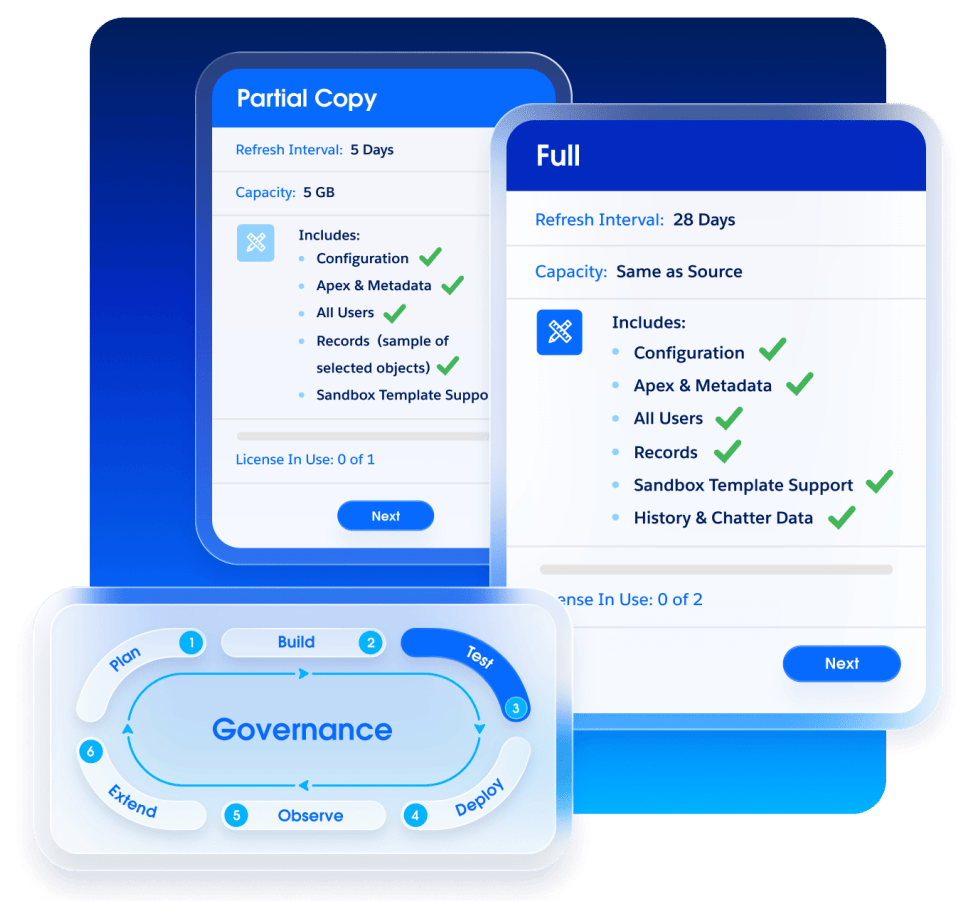
Separate environments for building and testing safely, without touching the live system, are standard practice. Developer sandboxes come with most editions, but the Partial Copy or Full sandboxes you need for testing with realistic data can be a recurring added cost, depending on your edition.
Source: https://www.salesforce.com/platform/sandboxes-environments/
GovCloud-specific overhead
If you’re deploying in Government Cloud, add line items most commercial budgets never see: AppExchange and third-party tool compliance review (making sure every app in your org actually meets federal requirements), and ATO Process Advisory, guiding your team through the Authority to Operate process itself.
Skip either one and you don’t get a smaller invoice, you get a delayed go-live while someone scrambles to fix it retroactively. For defense contractors, one CMMC note: third-party C3PAO certification (Phase II) has been on hold since July 2026 while DoD reviews the program. NIST SP 800-171 and self-assessment requirements still apply, so budget for those now and hold off on a C3PAO assessment until DoD issues new guidance.
Total Cost of Ownership vs. Initial Implementation Cost
Evaluating a CRM investment means looking past the initial setup fee to the real Total Cost of Ownership over several years. As your organization grows, the system needs to grow with it. Expect expanded data storage needs, recurring training, and periodic process reviews. Treat these as standard operating expenses, not one-time project costs you can forget about after go-live.
How to Control Costs Without Sacrificing Value
Managing your budget doesn’t mean compromising on capability. It means being deliberate about sequencing.
Adopt a phased approach. Rather than deploying everything at once, launch a focused, high-value core first and let your team adapt to it before layering on complexity. This is essentially what our Quick Start model does by design: a defined scope, a defined timeline, and a clear set of deliverables, so you know what you’re getting before the first invoice arrives.
Prioritize standard functionality over custom code wherever it gets the job done. Salesforce’s out-of-the-box workflows handle most business requirements without the long-term maintenance burden that custom code carries.
And choose a partner that actually transfers knowledge. The right partner trains your internal team throughout the engagement, so you’re not stuck paying external consultants to make basic admin changes two years down the road. That’s a design principle for us, not an afterthought: an implementation only counts as successful if your team can run it without us in the room.
Budget Planning Scenarios
Every project is unique, but here’s what real scope and timelines look like across three tiers, based on our own delivery data:
Focused expansions and smaller deployments
Think targeted scope: a defined process, an existing platform, a tight data set. Our three-week private car assessment expansion for a state regulatory commission, covering data model changes, automation, and legacy data migration, is a good benchmark for what this tier looks like.
Mid-market implementations
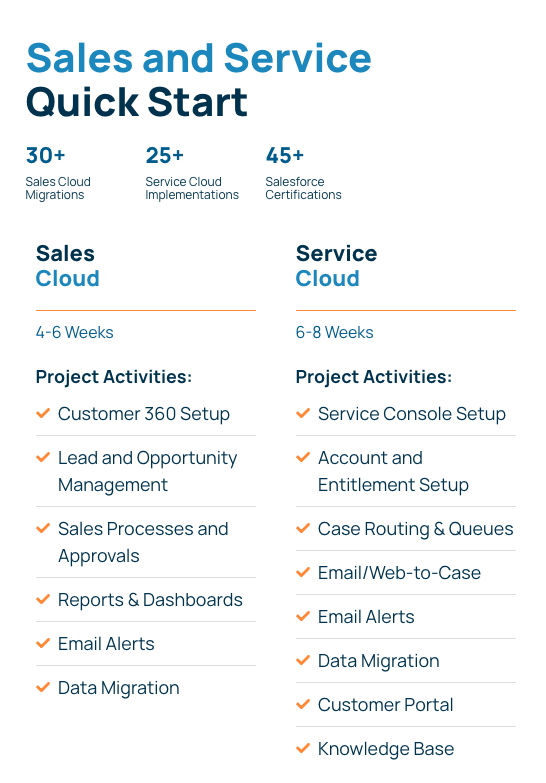
Full Sales Cloud or Service Cloud builds with moderate customization and integrations. Our published Quick Start timelines run 4-6 weeks for Sales Cloud and 6-8 weeks for Service Cloud, covering setup, data migration, reports and dashboards, and core process configuration.
Enterprise-scale and GovCloud transformations
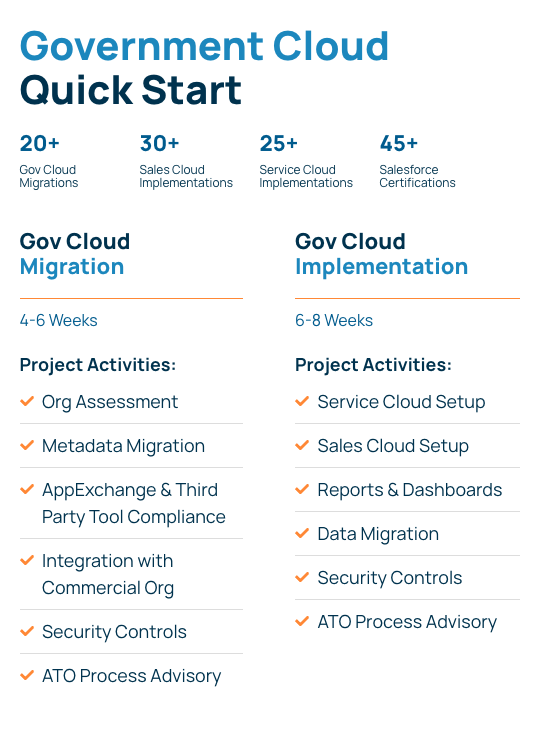
Multi-cloud architectures, FedRAMP or CMMC-related compliance requirements, large-scale migrations, organization-wide change management. Our GovCloud Quick Starts run 4-6 weeks for migrations and 6-8 weeks for full implementations.
For context on what a more complex build looks like end to end: working alongside a delivery partner, we delivered a FedRAMP-ready case management system in Salesforce Government Cloud for a defense technology organization in 10 weeks, including MFA, record-level security controls, and a branded self-service portal, followed by a 6-month managed services transition. That’s meaningful complexity delivered on a disciplined timeline, which is the whole point of scoping well from day one.
Why Transparency Matters in Choosing a Salesforce Partner
Low-cost, fixed-fee proposals look appealing on paper. Too often, though, they quietly omit discovery, data cleansing, or change management to keep the sticker price down. Once the project starts, those missing pieces tend to surface as scope creep, and worse, they can leave you with a system your own team doesn’t trust enough to use. A partner who gives you an honest, detailed cost breakdown up front is protecting your budget, not padding it.
How Vectr Solutions Helps You Budget with Confidence
We approach every project with a commitment to transparency and strategic alignment, without the jargon that makes budgeting harder than it needs to be.
Every engagement starts with a discovery-driven scoping phase. We analyze your existing workflows, security requirements, and data architecture to build a realistic, accurate proposal before any development work begins. Our team has delivered 20+ Government Cloud migrations, 30+ Sales Cloud implementations, and 25+ Service Cloud implementations across commercial, nonprofit, and highly regulated public sector environments, which means we know where Salesforce’s standard features can do the job and where custom work is actually worth the spend.
We also believe expertise doesn’t stop at go-live. Using the Prosci™ change management methodology, we design the transition around the people actually using the system every day, so your team becomes self-sufficient and capable of scaling the platform long after we’ve handed over the keys.
Understanding the true cost of Salesforce implementation helps you avoid surprises and get the return you’re planning for. To talk through your goals and get a clear, honest budget estimate, speak to an expert today!