

In a traditional CRM setup, the database and the user interface are stuck together like they’re one piece of furniture. The customer records live in the same box as the screens people use to see them, so any change to how data gets displayed also means touching the backend. That coupling is exactly why so many IT roadmaps stall out: a simple front-end request turns into a six-week platform ticket.
A headless CRM architecture pries those two layers apart. The system of record (the database, the validation rules, the business workflows) stays put, while the presentation layer moves out on its own. Instead of relying on a vendor’s built-in browser interface, organizations connect to their data through modern, API-first design principles.

This model has caught on for a simple reason: customer journeys don’t live in one place anymore. They’re spread across apps, portals, kiosks, chat windows, and increasingly, AI agents that never open a browser at all. Once the CRM becomes an invisible engine running in the background, teams aren’t boxed in by a template. They can build whatever the channel actually needs.
How Salesforce Headless CRM Works
In a headless deployment, Salesforce still does what it’s always done best: it holds the security rules, the field permissions, and the automated workflows as the central system of record. What changes is how people (and machines) get to it. Rather than routing everyone through standard Lightning pages, developers write software that talks to Salesforce programmatically, through secure APIs that expose data and logic to whatever’s asking.
Salesforce’s Headless 360 release, announced at TrailblazerDX in April 2026, pushed this further than most teams expected. It exposes core platform functions through three access patterns:
- APIs — every platform capability, callable as a REST endpoint.
- MCP tools — standardized tool definitions that any compatible AI client can discover and invoke.
- CLI commands — scriptable access for developers and automated pipelines.
The practical result is the same in all three cases: the browser is now optional rather than mandatory. External systems and autonomous AI agents can query live records, evaluate workflows, and trigger business rules without a human clicking through a single Lightning screen. It’s also a big reason headless architecture is shaping up to be one of the more practical threads at Dreamforce (September 15–17, 2026), where “Becoming an Agentic Enterprise” is the official theme: an agent can only act on your behalf if there’s a headless path for it to actually reach your data.
Standardized MCP tools let compatible AI clients discover and use Salesforce capabilities without custom integration code for every connection. When an AI assistant or a mobile app asks for data, that request still answers to the platform’s permission model sharing rules, permission sets, and field-level security are enforced identically on every call, whether a person made the request or an agent did. Where generative AI is involved, the Einstein Trust Layer adds grounding, data masking, and zero-retention protections on top. Layered onto that, the Agentforce Experience Layer separates a capability’s definition from how it renders, so a team can build a workflow once and have it show up natively as a mobile card, a Slack block, a voice interaction, or a public web page.
Traditional Salesforce vs. Headless CRM
In a standard Salesforce setup, the Salesforce UI isn’t optional, it’s the front door. Everyone works through the standard Lightning interface, which means the experience is only as flexible as whatever the platform’s own templates allow. It’s a model built for people logging into Salesforce directly, and it does that job well.
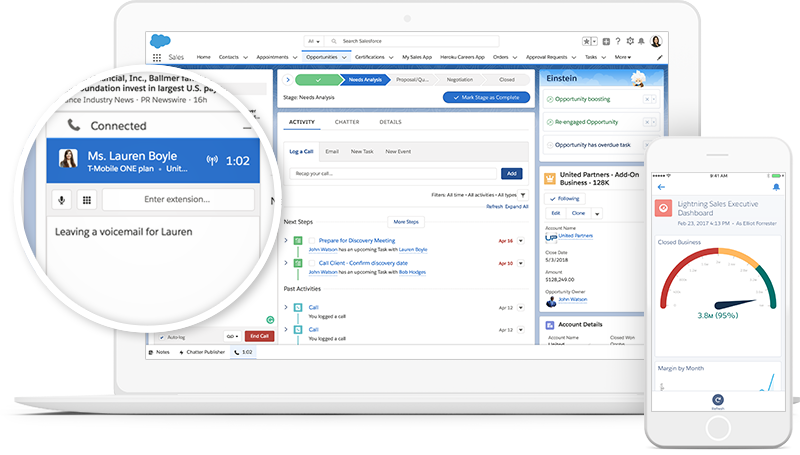
Source: https://www.salesforce.com/campaign/lightning/
Headless CRM changes what’s required to get in. Any front end can connect, whether that’s a custom web app, a mobile app, a portal, or an AI agent, because the architecture is API-driven rather than UI-driven. Users no longer need to work primarily inside Salesforce; they interact with it through whatever surface makes sense for them, while the front end and back end evolve on completely independent timelines.
Neither model is “wrong.” Standard Salesforce is still the right call for most internal sales and service teams. Headless earns its keep once your customer touchpoints stretch beyond what a Lightning page was ever designed to do.
Benefits of Salesforce Headless CRM
Greater flexibility. Once the UI layer is removed, teams aren’t stuck inside a predefined template. Developers can build in React, Vue, or Angular, keeping design control in-house instead of handing it to the platform.
Omnichannel experiences. A single set of business rules and records can feed a public website, a mobile app, a customer portal, and an internal tool at the same time, all pulling from the same source of truth.
Faster innovation. Front-end and back-end teams can build, test, and ship in parallel. Cosmetic updates and A/B tests no longer require a platform-wide deployment just to change a button.
Future scalability. New channels, virtual assistants, or portals connect to existing API endpoints instead of triggering an expensive redesign every time something new shows up.
Strong security and governance. Going headless doesn’t mean going around Salesforce’s controls. Every API call, MCP tool execution, or CLI action still authenticates and still answers to role-based permissions, field-level security, and validation rules set at the platform level. For environments handling sensitive or regulated data, Salesforce Shield adds platform encryption, event monitoring, and field audit history on top.
Common Use Cases for Salesforce Headless CRM
Public sector and government agencies are some of the most natural adopters of this model, because the underlying need is almost always the same: give people a clean, secure front door without exposing the internal CRM behind it. We saw this play out directly when three U.S. Service Academies needed a single nomination process instead of three separate ones. By unifying login and integration through MuleSoft, applicants, congressional offices, and academy staff could all work off one connected system instead of untangling data from three conflicting ones. Read the full Federal Nomination System case study.
The same pattern shows up in citizen services. A state child support agency processing more than 70,000 cases a year doesn’t need a redesigned Salesforce org; it needs a faster path between the case worker and the citizen. Reworking that data flow cut resolution time from 90 days down to 30, without a single change to the underlying business logic.
Beyond portals, headless infrastructure is increasingly what powers background automation and AI-driven work: routing tickets, updating records, and processing routine inquiries without a person keying anything in by hand.
When Does a Business Need Headless CRM?
The signal is usually obvious once you see it: your customer journeys span more channels than your UI can gracefully support, or you’re already running mature digital platforms that need live Salesforce data injected directly into them. It’s also the right moment if you’re actively investing in AI systems that need to search records, evaluate context, and trigger workflows without someone sitting in the loop for every step.
If none of that sounds like you yet, that’s fine too. Standard Salesforce is still doing its job. But if you’re not sure which camp you’re in, that’s a conversation worth having with an architect before you build around the wrong assumption.
Reach out to our team and we’ll help you map it out.
Common Implementation Challenges
Going headless doesn’t remove complexity, it relocates it. Designing stable, low-latency APIs that hold up under real data volume takes real architectural experience, not a weekend project. Identity and access management gets harder too, since now you’re authenticating a mix of external apps and AI agents instead of just employees logging into a browser. And once endpoints are decoupled, keeping data synchronized in real time takes continuous oversight, or you end up with a portal showing yesterday’s numbers.
The challenge teams underestimate most, though, isn’t technical at all. Headless architecture changes where people work. A caseworker who spent three years inside a familiar Lightning layout now works in a purpose-built portal; an internal team that knew exactly which tab held which field is suddenly navigating something new. The platform can be flawless and adoption can still stall, which is why we run headless engagements with the same Prosci-based change management approach we bring to any migration by mapping who is affected, what changes for them day to day, and what training and reinforcement it takes to make the new surface stick.
Best Practices for Salesforce Headless Implementations
Start with the business requirement, not the API. Design every integration around an actual user journey instead of building connections because they seemed useful. Secure every custom interface with token-based authentication and tightly scoped permission sets, and test everything in a sandbox with realistic data before it touches production. Governance isn’t a phase you get to later, either: validation rules and security guardrails need to be in place from day one, not bolted on after the first integration breaks.
How Vectr Solutions Builds Headless Salesforce Solutions
Decoupling a Salesforce org sounds simple until you’re the one holding the API keys. We’ve run this exact playbook enough times to know where teams usually get stuck, which is why every engagement moves through the same four phases: Discover, Setup, Extend, and Enhance. It’s less exciting than it sounds, and that’s the point. Nobody wants their CRM architecture to be exciting.
The Federal Nomination System project is a good example of what that looks like in practice. Three Service Academies, three separate systems, and a MuleSoft integration layer that had to unify login and data flow without disrupting how congressional offices already worked. That’s the same integration muscle we bring to any organization trying to connect a portal, a mobile app, or an AI agent to Salesforce without introducing technical debt along the way.
Security tends to be the part people worry about most, and rightly so. Every API and MCP connection we build inherits Salesforce’s platform security model and, where the data warrants it, Salesforce Shield for field-level encryption, real-time monitoring, and programmatic audit trails. When we worked with a delivery partner to stand up a hardened GovCloud environment for a mission-critical service operation, it was FedRAMP-ready in ten weeks, proof that “secure” and “fast” aren’t actually opposites when the architecture is built right the first time.
None of that work ends at launch. APIs drift, platform releases shift underlying behavior, and integrations need someone watching them long after the go-live champagne is gone. That ongoing piece runs through our Managed Services team, so the systems we help build stay dependable instead of becoming next year’s fire drill.
Build Flexible Salesforce Experiences Without Platform Limitations
Whether you’re standing up a citizen portal, connecting a mobile app, or getting ready to let an AI agent touch your CRM data directly, the question isn’t whether headless architecture can support it. It’s whether it’s built with the same discipline you’d expect from any other part of your Salesforce environment. That’s the part we care about most.
If you’re weighing whether a headless approach fits where your organization is headed, talk to an expert at Vectr Solutions and we’ll help you figure out what actually needs to change, and what doesn’t.
Attending Dreamforce this year? So are we and we’d love to connect in person.