
Key Takeaways
- Independent research puts the CRM failure rate at roughly 55%, and the cause is almost never the software. It is data architecture, integration design, and adoption planning decided in week one.
- DIY is a reasonable call for a small team with one pipeline and no integrations. It stops being reasonable the moment a second system has to connect or a compliance framework applies.
- A misconfigured sharing model is not a platform problem. Salesforce Government Cloud carries its own authorization, but permission sets, role hierarchies, and field-level security are yours to defend in an assessment.
- The goal of a good implementation partner is not dependency. It is a system your team can run without us.
Salesforce’s low-code tools make it look easy to build your own CRM. A few clicks in Flow Builder, a handful of custom objects, and it feels like your team just saved six figures in consulting fees.
That feeling lasts right up until the first quarter close nobody trusts, the first integration that quietly stops syncing, or the first auditor who asks why a permission set exposes data it shouldn’t.

At Vectr Solutions, we work almost exclusively with organizations where getting Salesforce wrong isn’t just inconvenient. It’s a compliance finding, a lost grant, a broken case pipeline, or a security incident. Nonprofits stretching every dollar. SLED agencies managing citizen data. Government contractors carrying CMMC and ITAR obligations.
These are exactly the organizations most tempted to self-implement, because budgets are tight and the platform looks simple. They are also the organizations that pay the highest price when a DIY build goes sideways.
Here is the part we want to be clear about up front, because it shapes everything below: we are not arguing that your team can’t run Salesforce. We build so that your team can run it. The question is who does the architecture, not who holds the keys afterward.
Why DIY Salesforce Implementations Seem Appealing
The appeal starts with math. Leadership looks at licensing costs, looks at the internal admin or ops person who’s “pretty good with tech,” and assumes that person can absorb configuration on top of their day job. For a mid-market company or a nonprofit running lean, skipping a consulting engagement looks like the obvious call.
Speed adds to the pull. Flow Builder and other low-code tools make Salesforce approachable to anyone with basic admin skills, and executive sponsors want results now, not after a formal discovery cycle. So teams skip planning and start clicking, assuming they can fix anything that breaks later.
The math isn’t wrong so much as incomplete. It prices the build and ignores the rebuild. Independent research from Johnny Grow puts the CRM failure rate at roughly 55%, measured as not meeting planned business objectives. That figure has barely moved in twenty years, across every generation of easier tooling, which tells you the difficulty was never in the clicking.
The Hidden Complexity Behind Salesforce Deployments
What the admin dashboard doesn’t show you is the relational data model, the automation engine, and the security architecture underneath it. Object relationships, field-level security, sharing rules, and data volume interact in ways that aren’t obvious until year two, when reporting stops making sense or the org starts timing out under its own automation.
Then there’s integration. Salesforce rarely runs alone. It has to talk to ERP systems, finance platforms, portals, and identity providers, and each connection point carries its own data mapping, security, and compliance requirements.

We saw this directly when three U.S. Service Academies needed one nomination process instead of three disconnected ones. Applicants were moving through separate admissions and nomination workflows across institutions that didn’t share data, with congressional offices caught in the middle. Building a single bidirectional data exchange across those systems, including a unified login for all three academies, took MuleSoft integration architecture, not a weekend of Flow Builder tinkering.
That’s the kind of work a DIY build almost never accounts for at the outset, because it isn’t visible from inside Setup.
Four Ways DIY Implementations Fail
Self-managed projects tend to fail in the same handful of ways, and the failures usually trace back to decisions made in week one, long before anyone realized they’d matter.
1. Poor data architecture. Inconsistent object design and loose field mapping create duplicate records and data silos almost immediately. Without governance from day one, reporting accuracy erodes fast, and by the time leadership notices, the fix means untangling years of bad data rather than adjusting a few fields.
2. Automation built faster than it can be understood. Teams trying to digitize every manual process at once end up with overlapping flows, conflicting validation rules, and automation nobody fully owns. Performance suffers, and routine updates turn into a guessing game about which flow will break next. In our experience the tell is simple: when nobody on staff can say with confidence what happens after a record is saved, the org has already outgrown its build.
3. Fragile integrations. Connecting third-party systems without a real integration design produces brittle data pipelines. When a sync breaks, sales, service, and finance start working from different numbers, and staff fall back to manual re-entry and shadow spreadsheets, the exact inefficiency Salesforce was bought to remove.
4. Security and compliance exposure. Permission sets and role hierarchies configured without certified oversight can expose PII or CUI without anyone realizing it. This is the failure mode most often misunderstood, so it’s worth being precise about it.
Where the Compliance Line Falls
Salesforce Government Cloud carries its own FedRAMP authorization. That covers the platform. It does not cover how you configured it.
Under a shared responsibility model, your sharing model, permission sets, field-level security, and data handling procedures sit on your side of the line. For an organization pursuing CMMC or operating under ITAR, an overly permissive profile isn’t a theoretical risk. It’s the kind of finding an assessor documents, and no platform authorization answers it on your behalf.
We built a secure sales pipeline for a defense manufacturer precisely because that line needed to hold from day one. That meant U.S. citizen delivery resources, MFA and SSO, separate development, QA, and UAT sandboxes, and Salesforce Shield event monitoring inside a FedRAMP-aligned boundary. None of that gets patched in convincingly after an assessment starts.
The Real Cost of Fixing a Failed Implementation
The budget case for DIY rarely accounts for what happens when it fails. Re-architecting tangled automation and rebuilding a broken data model almost always costs more than a properly scoped implementation would have, because a rebuild has to work around live data, live integrations, and users who’ve already lost patience.
The bigger cost is trust, and it doesn’t sit on a balance sheet. Once employees hit enough errors and workarounds, they stop believing in the system, and that skepticism doesn’t disappear when the technical issues get fixed.
The inverse is what a clean build buys you. When we helped Spartronics replace a sales process cobbled together from spreadsheets after multiple acquisitions, re-engineering the stages and gates, consolidating account data, automating forecasting, and segregating data for ITAR compliance, the results were measurable:
- Sales pipeline increased twofold
- Lead conversion grew by 100%
- Days saved in forecast and leadership report preparation
- Materially improved forecast accuracy
Those numbers came from getting the structure right the first time, so the team could focus on selling instead of fighting the tool meant to help them sell.
Adoption Is Where Most DIY Builds Actually Die
Most failed rollouts aren’t technology failures. They’re change management failures.
DIY projects tend to focus entirely on features and skip the harder work of preparing people to use them. Training gets skipped. Documentation gets skipped. Staff quietly return to the spreadsheets and side systems they trust more than the new platform.
We’ve written before about what it costs to skip change management entirely, and the pattern is consistent. Skipped change management isn’t change management saved. It’s change management paid for later, with interest.
This is why we apply the Prosci™ methodology and its ADKAR® framework as part of the build rather than as a phase bolted onto the end. A system that doesn’t match how people actually work will get abandoned no matter how well it’s configured.
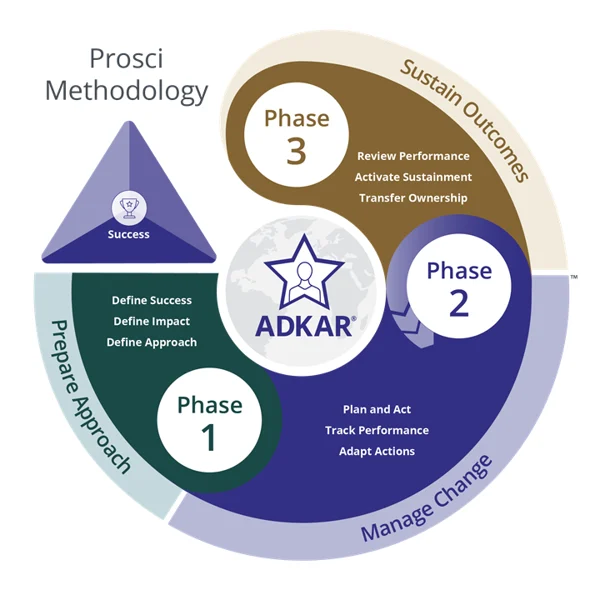
Source: https://www.prosci.com/blog/prosci-methodology
When DIY Works, and When It Stops Working
DIY isn’t automatically the wrong call. The honest version of this decision looks like a threshold, not a verdict.
| Your situation | Reasonable approach |
| Small team, one sales pipeline, no integrations, no regulated data | Build it internally |
| Experienced Salesforce staff already on payroll, but no architectural bandwidth | Advisory & Governance to keep your team on track |
| Cross-department automation, real reporting needs, or more than one connected system | Partner-led implementation |
| CMMC, ITAR, FedRAMP boundary, CUI, or PII in scope | Partner-led, with the security model designed first |
| Live org, one overloaded admin, growing backlog | Managed Services |
That first row is real, and the runway is short. The moment an organization needs cross-department automation, meaningful reporting, or a second connected system, self-managed setups start accumulating risk quickly.
If you already have Salesforce expertise in house, the answer usually isn’t a full engagement or a solo build. It’s governance support that keeps your own team on track. That’s a recommendation we make regularly, and it costs us revenue when we make it.
How Vectr Solutions Approaches This Differently
Vectr Solutions was founded by senior Salesforce architects, which means the discovery work described above isn’t a sales step before the “real” project starts. It is the project.
Our Discover, Setup, Extend, Enhance methodology front-loads what DIY builds skip. We spend the first phase understanding how your teams actually operate, where data has to flow, and which compliance requirements are non-negotiable, before a single object gets built. That sequencing is what keeps a nonprofit’s phased rollout predictable and a defense contractor’s permission model assessment-ready from the first review, rather than discovering the gap six months in.
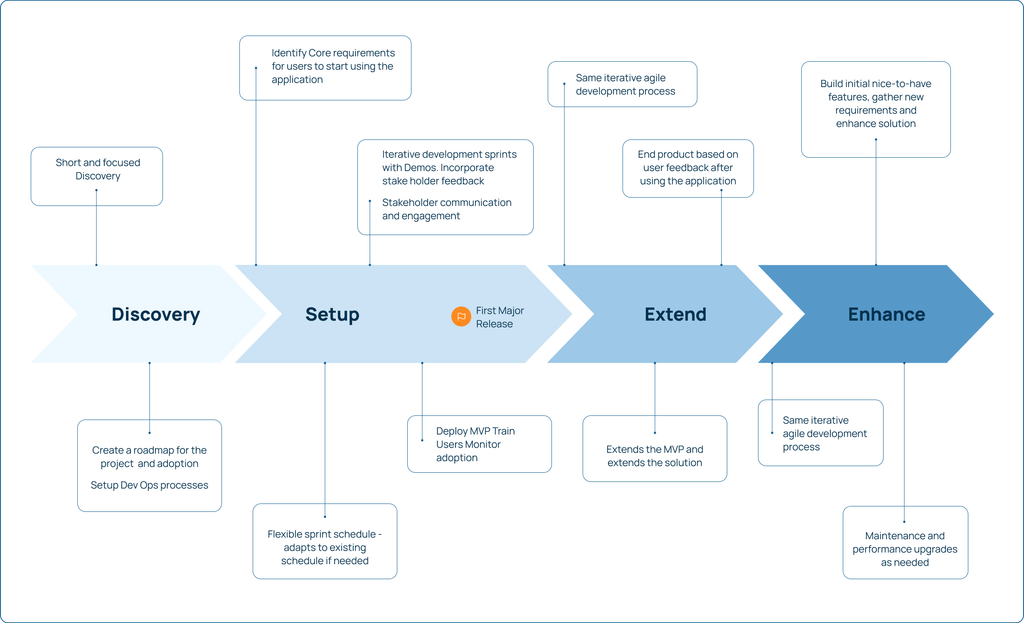
The other thing DIY builds rarely plan for is what happens after go-live. A system that works on day one and a system that still works three years in are not the same thing, and the difference usually comes down to whether anyone planned for growth, staff turnover, or the next platform release. That’s why our engagements don’t end at launch. Managed Services keeps the platform moving with the organization instead of quietly falling out of date, which is the most common fate of a self-managed build.
And the point of all of it is self-sufficiency. We believe expertise doesn’t stop at a good implementation. It extends to making sure you can operate, extend, and defend the solution after we hand it over. A DIY build and a Vectr build should end in the same place. They just shouldn’t start in the same place.
Don’t let a DIY build cost more than the partner would have.